
[ 00 / 12 ]

[ AIDESK | TEAM CHAT | DOCUMENTS | AUTOMATION | SOVEREIGN AI ]

LESS SEARCHING. LESS REPETITION. MORE TIME FOR PEOPLE.

AIDESK | YOUR TEAM'S AI WORKSPACE

Less admin. More time for your business.

One AI workspace for documents, team chat, customers, tasks and automation. Email connects the work, but AIDesk helps your team with much more than its inbox.

Keep sending and receiving in Outlook, Gmail or your existing mail client. AIDesk works alongside them, with sovereign deployment on your premises or in Europe.

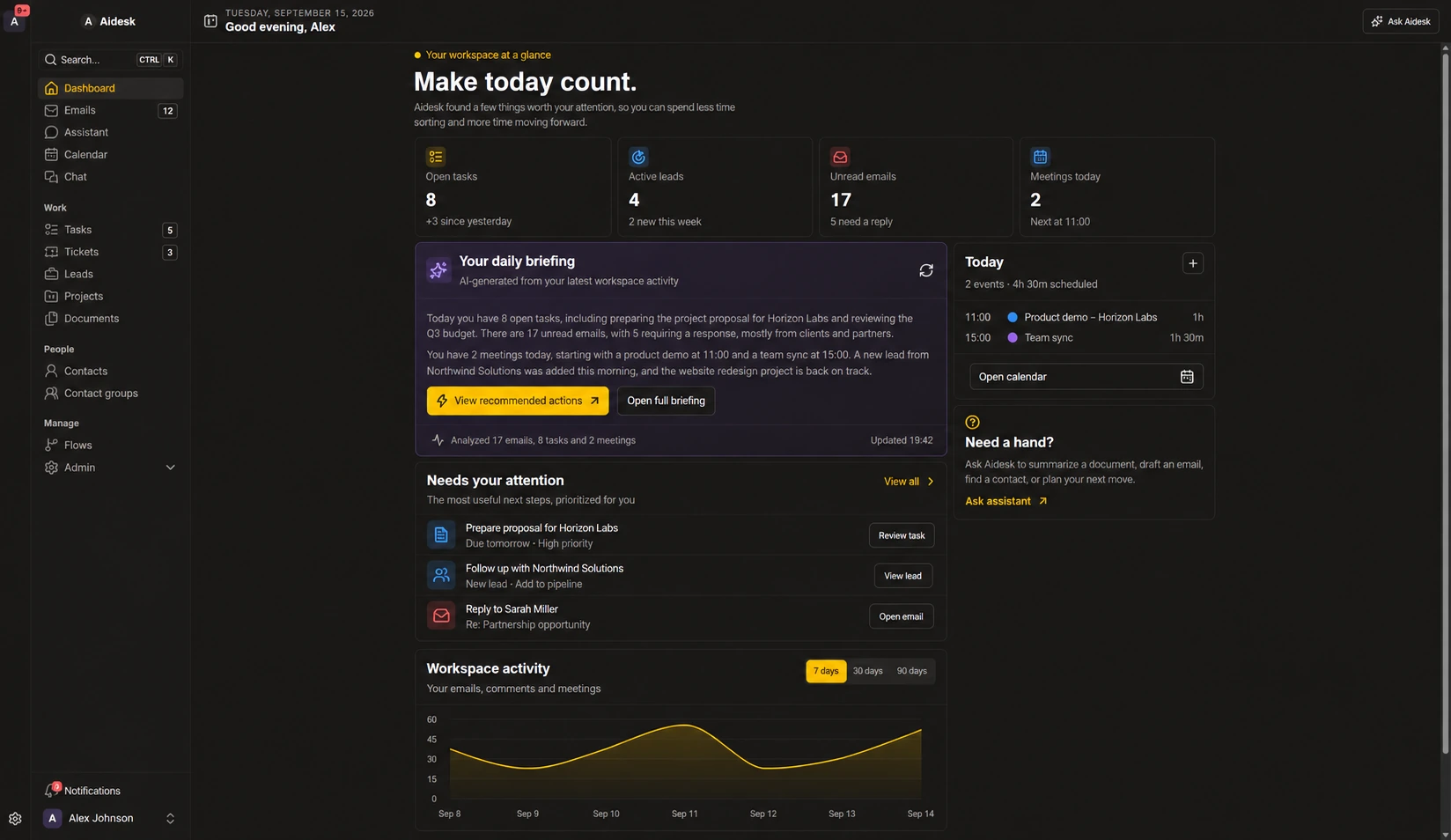
Your team, your priorities, your working day. Connected.

The renewed AIDesk dashboard brings your daily AI briefing, priorities and calendar together. Demonstration with fictional data. Select the image to enlarge it.

WHY AIDESK IS DIFFERENT

Your business data. Your control.

Time-saving AI should fit your organisation, not force you to give up control of its information.

01DATA SOVEREIGNTY

Sovereign AI, on premises or in Europe

Choose an on-premises or European-hosted deployment with private AI endpoints. For a sovereign setup, we configure document processing, AI inference and search indexing within the agreed environment.

Access controls govern who can read and act on your information. We agree hosting locations, connected services and data flows with you before rollout.

02NO FORCED SWITCH

Keep your email app. Add a shared workspace.

You do not have to move everyone to AIDesk to keep emailing. Connect Microsoft 365, Google Workspace or a supported IMAP mailbox while your team keeps its familiar mail client.

Configured automations work in the background. Open AIDesk when you want the shared overview, AI assistance, document analysis or team collaboration in one place.

03SHAREPOINT & YOUR EXISTING TOOLS

Connect the knowledge you already have

Need SharePoint, OneDrive or another business system in the workflow? ElioVP can scope and implement an integration around your existing documents and processes.

These are tailored integrations, not standard mailbox connectors. Together we define permissions, synchronisation and which information AI may use.

  • ON-PREMISES
  • EU-HOSTED
  • CONTROLLED ACCESS
  • MICROSOFT 365
  • GOOGLE MAIL
  • IMAP

WHERE YOUR TEAM WINS TIME BACK

Less busywork across the whole working day

For the business owner doing everything, the service team sharing an inbox and the larger organisation coordinating departments. Start with the work that takes too much time today.

AIDesk email thread and ticket workspace

Spend less time writing replies

Summarise long threads and prepare reply drafts informed by earlier emails and documents. Review the answer before sending.

Email workflow
AIDesk task board with assignees and linked records

Stop chasing the next step

Turn email and chat into assigned tasks and tickets, with the original conversation attached. See who owns what without another status meeting.

Collaboration
AIDesk dashboard with recent client and email activity

Find answers, not just files

Analyse PDFs, Word documents, scans and photos. Search the extracted content and keep findings connected to the source.

Document analysis
AIDesk flows list with automation rules and recent executions

Let routine work move itself forward

Automate recurring routing, task creation and record updates with visible rules and execution history.

Flows

PRODUCTIVITY IMPACT ESTIMATOR

How much productive time could AIDesk give your team back?

Estimate the time currently lost to inbox triage, searching for context, manual follow-up and repetitive administration.

Start with this illustrative 10-person team at €75 per productive hour, then adjust every assumption to match your organisation.

YOUR PRODUCTIVITY SCENARIO7 of 7 time-saving areas included

Inbox triage & routing

Sorting incoming messages, assigning ownership and deciding what happens next.

Finding customer context

Looking up contacts, previous messages, tickets, projects and account history.

Task creation & follow-up

Turning requests into tasks, assigning owners and checking what remains open.

Team handoffs & status updates

Explaining context, asking for updates and moving work between colleagues.

Finding documents & history

Searching for the right file, decision, note or previous piece of work.

Repetitive workflow steps

Manual routing, record updates, reminders and recurring administrative actions.

Summarising & drafting

Reading long threads, preparing summaries and drafting routine responses.

MAIL DESK

An AI email assistant with the context to help

AIDesk connects to Microsoft 365, Google Mail, and IMAP instead of forcing a disruptive rip-and-replace.

Teams can keep their familiar mail client while AIDesk keeps the message, customer, ticket, and assigned work visible together.

AIDesk email thread view with linked ticket and tasks

Understand the request sooner

Get thread summaries, classifications and suggested actions. Create a contact, lead or calendar event from the email context instead of retyping the details.

Draft with your own knowledge

AI can research earlier emails and documents while preparing a reply. It highlights missing information so your team can review, edit and send with context.

Mailbox compatibility

Connect Microsoft 365, Google Workspace or Gmail, and supported IMAP mailboxes while Outlook, Gmail, and existing mail clients continue to work.

YOUR DAILY AI ASSISTANT

Start with a clear picture. Get to the next action.

Spend less time collecting updates from different screens. Ask the assistant for help with the records you can access, and keep the work in the same workspace.

A personal daily briefing

See priorities, upcoming meetings and follow-ups in a daily overview, with links back to the underlying work. Briefings recommend next steps; they do not carry them out.

Ask, find and act

Use a conversational assistant to search business context and work with supported records and actions, within your access permissions.

Keep the team in the loop

Turn internal chat into a task or ticket and keep the source linked. Colleagues can pick up the work without asking you to explain it all again.

AI DOCUMENT & IMAGE ANALYSIS

PDFs, documents, photos. Put their contents to work.

AIDesk does more than store attachments. It analyses text and visual content so useful information does not stay buried in files.

Read files, scans and images

Analyse PDFs, Word documents, spreadsheets, presentations and photos. Text extraction, OCR and visual analysis help make both written and image-based information usable.

Find the relevant detail

Search document content and inspect findings with source references. Link documents to the customer, email, project or ticket they belong to.

Turn findings into follow-up

Create source-linked tasks from analysed documents. Keep responsibilities and supporting information together instead of copying them into separate tools.

Supported formats and analysis depend on the configured extraction and AI services. Scans, encrypted files and complex layouts can need extra handling. Review important findings against the original file.

TEAM CHAT & SHARED CONTEXT

Discuss the work. Share the context. Move forward together.

Bring colleagues into the same conversation without starting another round of forwarded emails.

One-to-one, groups and channels

Talk directly with a colleague, bring several people into a group conversation or organise discussion in channels. Replies, mentions and reactions keep the conversation connected.

Files and email beside the discussion

Share files and link the relevant email conversation or business record in chat. Keep the source close to the discussion instead of forwarding more copies or giving everyone your whole mailbox.

From a conversation to an action

Ask the AI assistant in chat to help with context or create a task or ticket. Keep the resulting work linked to the conversation so decisions are easier to follow up.

Source access settings still apply: linking a file or email does not automatically restrict it to the chat participants. Email links refer to a conversation, not an automatically redacted excerpt. Review the content and reading permissions before sharing.

TEAM WORK

Work together, beyond the inbox

Discuss work with colleagues, share useful context and coordinate customers, projects and tasks in one workspace. Email is one source of information, not the only way to get things done.

AIDesk task board grouped by work status

Tasks

Assign the next action, link the source email thread, and keep ownership visible on a clear board.

Tickets

Track support requests from email with priority, workflow state, internal comments, and external message count.

Leads and projects

Move opportunities and delivery work through organisation-specific stages.

Contacts and groups

Keep customer people, contact groups, and conversation history near each decision.

Documents

Store managed documents and link files to emails, tasks, leads, projects, and tickets.

Calendar and chat

Manage appointments and invitations, discuss work with colleagues and follow notifications without leaving the workspace.

FLOWS

Workflow automation without losing visibility

AIDesk Flows turn mailbox and record events into automations that remain visible to the team.

Teams can create organisation-wide and personal flows, review recent executions, and decide when automation should continue or stop.

AIDesk flows system with automation rules and execution history

Event triggers

Start flows from received email, lead state changes, project state changes, or calendar updates.

AI and actions

Analyze email threads, ask AI questions, create tasks, update states, route messages, and forward context.

Execution history

Recent runs show status, source records, dry runs, and trace links so automation remains auditable.

BEFORE YOU GET STARTED

Common questions about AIDesk

Do we have to replace Outlook or Gmail?

No. AIDesk connects to your existing email environment. Your team can keep sending and receiving in its familiar mail client while configured workflows run in the background. Use the AIDesk workspace when you want its AI assistant, document analysis, team chat and shared overview.

Is AIDesk only useful for email?

No. Analyse documents and images, ask AI about your business information, chat with colleagues, manage tasks and projects, and coordinate appointments. These capabilities are useful beyond email, even though email often connects the work.

Is AIDesk suitable for a small business?

Yes. Start with one time-consuming workflow, such as handling enquiries or finding information in documents. Larger teams can add shared ownership, team workflows and access controls. We scope the setup around your organisation.

Can AIDesk work with SharePoint?

ElioVP can implement a tailored SharePoint integration and assess connections to OneDrive or other business systems. Scope, permissions and synchronisation are agreed for your environment. SharePoint is not a standard mailbox connector.

Can our data stay in our own environment?

Yes, with a sovereign deployment configured for that purpose. AIDesk supports private AI endpoints. We define where hosting, document extraction, model processing and indexing run, and review any external connections before rollout.

How much time will we save?

That depends on the volume of work, your processes and how the team uses AIDesk. Use the estimator as a planning exercise, then measure a representative workflow before and during a pilot. We do not promise a fixed number of hours or a guaranteed financial return.

What would your team do with more time?

Bring us one repetitive workflow: an inbox, a document process or a customer handoff. We will show you where AIDesk can help and how to measure the difference.